You can now change how fast a simulation runs
When you watch a warehouse simulation, time is rarely “just right.” Sometimes you want to slow things down to see a transfer handoff. Sometimes you want to speed up a quiet stretch so you can get to the busy part of the day.
Until now, RackFlow mostly ran at one pace. That worked, but it made some questions harder than they needed to be. So we added something simple: playback speed.
You can run a simulation slower or faster than real time.
What that is useful for
A few situations where this helps:
- Slow motion for detail. Drop the speed when two conveyors meet, when a shuttle turns, or when a queue starts to form. You see the sequence instead of guessing from a blur.
- Faster through the dull parts. Raise the speed when the layout is settling or when you already understand a stretch of the run.
- Try a change, then watch again. Adjust the layout, start the simulation, and move through the scenario at a pace that fits the question you are asking.
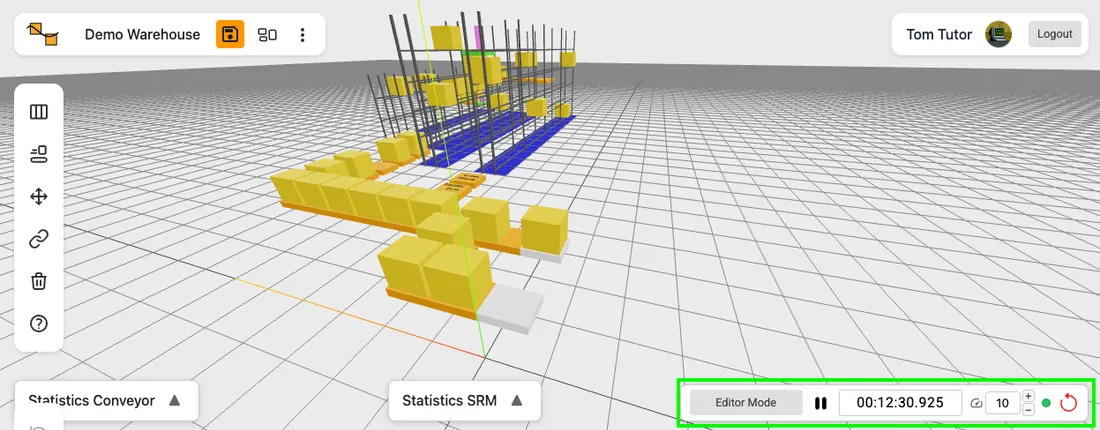
The range is wide enough for careful watching and for “just get me there”: from a hundredth of real time up to much faster. You do not need to learn a new concept. You set a number, and the simulation follows.
A small refresh to the simulation panel
While we were in that part of the product, we also cleaned up the simulation controls.
The panel is a bit clearer now. Entering simulation mode feels more like a deliberate step. Play and pause share one control instead of sitting side by side. The clock and speed controls look quieter when they are not in use.
None of that is the headline. It is just meant to make the toolbar feel a little less like a pile of switches.
Conclusion
It is a practical control for people who already use the 3D view to think through a layout.
If something still feels awkward—speed steps, labels, when controls enable—we would love to hear from you. Share your experience via mail.
Give it a try
Open a layout, switch into simulation, and change the speed while it runs. Slow it down for a few seconds. Speed it up again. Reset if you want a clean start.
If that helps you see something you would have missed before, then the feature did its job.